
A fresh quiz every week. Never the same question twice at the same pub.
Reuse your best questions and rounds, and QuizLinq keeps track of what you've already played at each venue. Less admin, more time for the fun part.
Free to host. Venue tracking and your library come with Plus.
Run the whole night from your phone
Everything a pub quiz needs on the night: the Quiz Remote in your hand, questions on any TV or projector, and teams answering on their own phones. No app for anyone.
See all features →Writing questions is the fun part. Keeping track of them isn't.
Starting from scratch
You wrote a great music round in March. Finding it again means opening one old quiz after another.
Your spreadsheet can't tell you this
Was that the one you asked at The Red Lion last month? Your regulars will remember. And they will tell you.
Guessing the difficulty
You think a question is easy until no table gets it. Or you think it's hard and every table does.
Build next week's quiz from your best material
Every quiz you write becomes material for the next one. Find it, organise it and reuse it instead of typing it all out again.
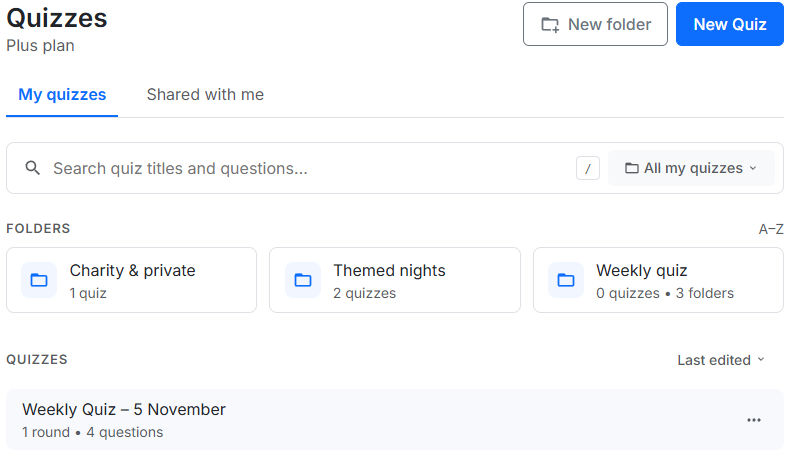
- Search every quiz - find that one question without opening your old quizzes one by one.
- Folders - keep each venue's quizzes, seasonal specials and themed rounds together.
- Copy questions or whole rounds - pull them into a new quiz in a few clicks.
- Export to Excel - the quiz structure, settings and every question in a file you keep, for your own records.
Never repeat yourself at the same venue
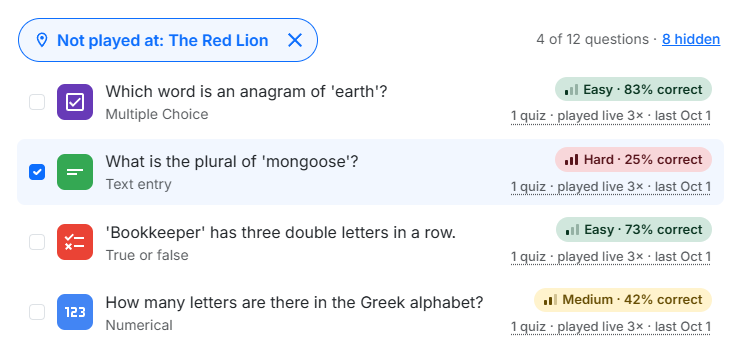
Add the venues where you host and tag each quiz night to one, including earlier nights. From then on, QuizLinq remembers what you played where. Tuesdays at The Red Lion and Thursdays at The Crown? A question used on Tuesday is still fresh for Thursday.
- 1Start your new quiz Choose to copy questions from another quiz.
- 2Search your questions Find what you want across your library.
- 3Leave out what they've heard Filter out anything already played at The Red Lion.
- 4Copy into your new quiz Fresh for that room, and nothing written twice.
Know which questions land
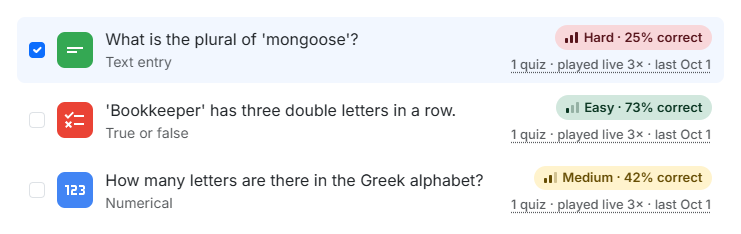
Every question gets a difficulty score from how players actually answered, not from your own guess. It sharpens with every quiz night you host.
- Difficulty from real results - see which questions every table gets and which nobody does.
- Play history - how many times a question has been played live, and when it was last used.
- Balanced rounds - mix easy and hard on purpose, instead of finding out on the night.
Free to run. Plus to prepare.
You can host every week for free. Plus adds the preparation tools, along with extras for the night like Bluff, themes and reveal effects.
Everything you need to run a great quiz.
- ✓ Six scoring question types
- ✓ Images, audio, video & YouTube
- ✓ Quiz Remote
- ✓ Live Mode up to 150 players
- ✓ Unlimited live events
- ✓ No credit card needed
Full access for 7 days — perfect for a one-off event.
- ✓ Everything in Free
- ✓ Live Mode up to 250 players
- ✓ Bluff, polls, word clouds & slides
- ✓ Custom themes & reveal effects
- ✓ Quick awards & off-screen activities
- ✓ Reports
For regular quizmasters who run quizzes month after month.
- ✓ All Plus features, with no 7-day limit
- ✓ Search, folders & copying questions or rounds
- ✓ Venues & play history
- ✓ Question difficulty & Excel export
- ✓ Cancel anytime
Your library stays yours. If you stop Plus, your folders, quizzes, venues and play history all stay, and you can still open and edit every quiz. A quiz that uses Plus features needs Plus to host live. Compare all features
Common questions
Do I need Plus to run my weekly quiz?
No. Running the quiz is free, every week, with six scoring question types and up to 150 players or teams. Plus adds the tools for preparing it (your searchable library, folders, copying, venues and question insights), along with extras for the night such as Bluff, polls, custom themes and reveal effects.
Can I see which questions I've already used at a venue?
Yes. Tag each quiz night to a venue, including nights you hosted before you had Plus, and when you copy questions into a new quiz you can leave out the ones already played there. Venues are part of QuizLinq Plus.
Can I copy a round from another quiz?
Yes. With Plus you can copy single questions or a whole round from any quiz in your library into a new one.
Can I export my quizzes?
Yes. With Plus you can export a quiz to an Excel file with its structure, settings and every question, so you can keep your own records.
What happens to my quizzes if I stop Plus?
They stay. Your folders, the quizzes in them, your venues and your play history are all kept, and you can still open and edit every quiz. A quiz that uses Plus features, such as Bluff or a custom theme, needs Plus to host live. Copying, search, venue filtering and managing folders come back when you switch Plus on again.
How is question difficulty worked out?
From how players actually answered when the question was played live, not from a rating you set yourself. A question gets its score once it has been played, and the score becomes more reliable every time it is played again.
Why aren't the questions on the phones?
Because a quiz night happens in the room. A team can't all read one small phone, so questions and media go on the big screen, where everyone watches together. One phone per team is enough, and it's only for answering.
Write it once. Use it for years.
Start free and host your first quiz. When you switch on Plus, your earlier quiz nights can be tagged to a venue too.